

AI automation has become one of the biggest productivity hacks of 2026. If you’re building websites, blogging, doing freelance work, or running an online business, automation can cut hours of repetitive tasks and help you earn more with the same ...
Enceodemore Latest Questions

No. Google doesn’t care whether your content is written by a human or AI.Google only cares about:ValueAccuracyExpertiseUser experienceHelpful answersIf your AI content is optimized, edited, factual, and helpful, it ranks just like human content. Pro Tips:Add your own examples or ...
When your website refuses to rank, it’s usually not a Google penalty. Most of the time, the issue is structural, technical, or content-related. Here’s a quick breakdown you can fix TODAY. 🔍 1. Your Page Has No Search Intent If ...
Most slow-loading WordPress sites suffer from one hidden issue: render-blocking CSS and JavaScript. These files delay your page from showing anything to the user. ✅ How to Fix It:Enable “Load CSS Asynchronously” using plugins likeWP Rocket, LiteSpeed Cache, ...
Top Free Themes in 2025:GeneratePress – Lightweight & SEO-friendlyAstra – Popular + fastBlocksy – Modern & customizableNeve – Perfect for business sitesKadence – Balanced speed + design💡 Pro Tip: Always pair themes with caching & image optimization.
Optimize titles & meta descriptionsUse Rank Math for schemaSubmit XML sitemaps to GoogleFix Core Web VitalsBuild backlinks naturallyUpdate content regularly
Steps:Choose fast hosting (SiteGround, Cloudways)Install lightweight theme (GeneratePress, Astra)Add essential plugins (Rank Math, Elementor, LiteSpeed)Customize brandingSecure with SSL + firewall
🔥 Top 2025 Trends:AI-assisted codingServerless architectureJAMstack websitesWeb3 & blockchain integrationNo-code SaaS building
✅ Check wp-config.php database credentials✅ Repair database via phpMyAdmin✅ Disable faulty plugins✅ Increase server resources✅ Contact hosting support if unresolved
Examples:Multi-cursor editing → Alt + ClickCommand Palette → Ctrl + Shift + PGit integration built-inAI autocomplete extensionsIntegrated terminal shortcuts
Use LiteSpeed Cache or WP RocketOptimize images (WebP/AVIF)Minify JS & CSSUse Cloudflare CDNEnable lazy loadingUpdate PHP versionMonitor with PageSpeed Insights
Freelancing on Upwork/FiverrSelling WordPress pluginsBuilding Micro SaaS toolsStarting a YouTube channelCreating digital courses/eBooks💡 Pick one → scale → diversify later.
🖥 Methods to Install WordPress LocallyXAMPP / MAMP → Classic method.LocalWP → Fastest for beginners.DevKinsta → Developer-friendly.Steps: Download → Create DB → Install WordPress → Login at /wp-admin.💡 Use LocalWP if you’re just starting.
🔐 Security Checklist 2025✅ Use 2FA for logins✅ Update plugins & themes✅ Use Web Application Firewall (WAF)✅ Run malware scans weekly✅ Block brute-force with tools like Wordfence, Cloudflare✅ Always use SSL/HTTPS💡 Security = trust. Never skip it.
Want to write smarter code in 2025? Follow these proven coding practices:✅ Use AI-assisted coding (Copilot, Tabnine).✅ Follow clean code principles (naming, indentation, modularity).✅ Write tests first (TDD saves time later).✅ Secure by default (sanitize inputs, HTTPS, no hardcoded passwords).✅ ...
AI isn’t just hype anymore—it’s a developer’s best assistant. In 2025, AI tools are helping developers write code, debug faster, generate content, and even create SaaS products.🔥 Top AI Tools for 2025ChatGPT 5 – Best for coding + ...
Use lightweight themes (like GeneratePress, Astra).Optimize images with free tools (TinyPNG).Enable browser caching via .htaccess.Use a CDN like Cloudflare.
Tools like ChatGPT Free, Perplexity AI, and Copy.ai Free Plan are great options. They provide decent content drafts, but always refine for SEO + originality before publishing.
WordPress powers more than 40% of websites worldwide, and the right plugins can take your site from average to outstanding. But with thousands of plugins available, choosing the best ones can be overwhelming. In this post, we’ll cover the 10 ...
WordPress powers more than 40% of websites worldwide, and the right plugins can take your site from average to outstanding. But with thousands of plugins available, choosing the best ones can be overwhelming. In this post, we’ll cover the 10 ...
The best online business ideas right now depend on your skills, interests, and investment capacity. Since you’re already involved in WordPress development, freelancing, and website-related businesses, here are some high-potential online business ideas that align with your expertise:
add_action('template_redirect', 'redirect_logged_out_users_to_welcome');function redirect_logged_out_users_to_welcome() { // Allow access to login page, registration, and welcome page if ( is_user_logged_in() || is_page('welcome') || is_page('login') { return; }// Redirect all other users to welcome page wp_redirect(home_url('/welcome/')); exit; }
Adding an AI chatbot to your site in 2025 is easier (and smarter) than ever — and yes, you can do it for free! Here’s a step-by-step solution: ✅ Top Free AI Chatbot OptionsTidio AI (Free Plan) ...
Great question! In 2025, AI can do more than just write blog posts — it can supercharge your site performance too. Here’s how:✅ 1. AI-Powered Image OptimizationTools like ShortPixel AI or Imagify use smart compression algorithms to reduce image ...
Caching alone isn’t enough. Your site might have:Unoptimized images (use WebP with compression),Too many plugins (deactivate the unused ones),Slow hosting (switch to LiteSpeed or VPS),Or render-blocking JavaScript/CSS.Fix it: Use tools like GTmetrix & PageSpeed ...
EncodeMore Scripts (😉 coming soon)Carbon, GitHub Gist, CodePen, and Stack Overflow snippets.Organize locally with SnippetsLab or Raycast AI Snippets.
EncodeMore Scripts (😉 coming soon)Carbon, GitHub Gist, CodePen, and Stack Overflow snippets.Organize locally with SnippetsLab or Raycast AI Snippets.
Change the wp-admin URLAdd reCAPTCHALimit login attemptsUse plugins like Wordfence, iThemes SecurityEnable 2FA (Two-Factor Authentication)
Absolutely! Google prioritizes HTTPS websites for SEO, and it’s essential for user trust. Use Let’s Encrypt for free SSL.
✅ Wordfence Security – Full firewall protection with malware scanning. ✅ Cloudflare Free Plan – Protects against DDoS and bot attacks.
✅ Use Limit Login Attempts plugin to block brute force attacks.✅ Change the default /wp-admin URL with WPS Hide Login.
✅ VS Code – Best for all-purpose development.✅ Sublime Text – Lightweight and fast.✅ Brackets – Ideal for frontend developers.
✅ Use CSS prefers-color-scheme: dark for auto-detection.✅ Add a toggle button with JavaScript local storage to save user preferences.
✅ Use Additional CSS in the WordPress Customizer.✅ Install Simple Custom CSS & JS plugin for better control.
✅ Tidio AI Chatbot – Great for customer support.✅ OpenAI GPT integration – For custom AI-powered chatbots.
✅ Tidio AI Chatbot – Great for customer support.✅ OpenAI GPT integration – For custom AI-powered chatbots.
✅ Yes! Use ChatGPT for automated replies, WP AutoPilot for AI content, and Uncanny Automator for workflow automation.
✅ Frase.io – AI-powered SEO optimization for ranking blogs.✅ Writesonic – AI-generated articles, social media posts, and ad copies.V
✅ Elementor (Best for drag-and-drop & flexibility)✅ Bricks Builder (Lightweight & fast performance)✅ Oxygen Builder (For developers who want full control)
✅ Use All-in-One WP Migration or Duplicator for an easy transfer.✅ Choose a staging site for testing before going live.
✅ Rank Math – Offers advanced SEO features, schema markup, and keyword tracking for free.✅ Yoast SEO – Good for beginners, but lacks advanced features without premium.
✅ Rank Math – Offers advanced SEO features, schema markup, and keyword tracking for free.✅ Yoast SEO – Good for beginners, but lacks advanced features without premium.
Start by building a solid portfolio showcasing your web development skills. Sign up on freelancing platforms like Fiverr and Upwork, create specialized gigs (e.g., WordPress development), and focus on client communication and building a good reputation to land higher-paying projects.
AI is revolutionizing web development with tools that automate content creation, optimize SEO, and assist with user experience (UX) design. AI-powered website builders like Wix ADI and WordPress plugins like RankMath AI can significantly improve the quality of websites and ...

Ensure your website uses SSL certificates for HTTPS, and install a security plugin like Wordfence or Sucuri. Regularly back up your site, use strong passwords, and limit login attempts to prevent brute force attacks. Always update WordPress, themes, and plugins ...
To optimize your WordPress site, consider using the LiteSpeed Cache plugin, a fast, lightweight theme like GeneratePress, optimizing images with TinyPNG or ShortPixel, and utilizing a Content Delivery Network (CDN) like Cloudflare for faster content delivery. Always keep your plugins ...

To find out what your WordPress site’s current maximum upload size limit is, go to WP Admin > Media > Add New. As shown in the screenshot, the current maximum upload size is displayed at the bottom.
Run powershell as administrator: Open the command prompt, type PowerShell, and then enter “Start-Process powershell -Verb RunAs”. This will open a new PowerShell window with administrator privileges.Type the following code and press “Eenter”
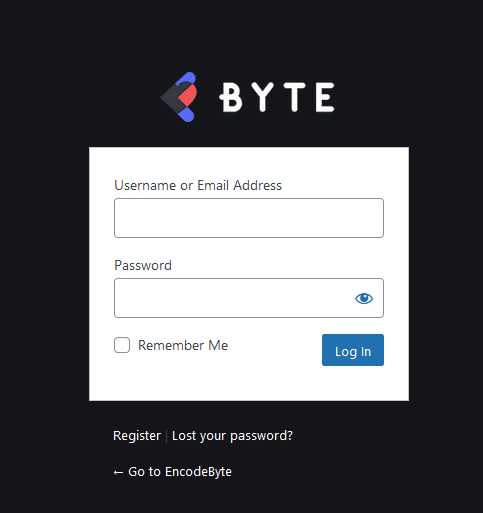
/* ----------------------------------------------------------- Add these code to functions.php ----------------------------------------------------------- /*Changes the main Login page url link*/ function wp_login_page_URL( $url ) { $url = home_url( '/' ); return $url; } add_filter( 'login_headerurl', 'wp_login_page_URL' ); ----------------------------------------------------------- /*Replaces the default WordPress Logo*/ function add_logo_Login_page() { echo '<style>.login h1 a { background-repeat: no-repeat; background-image: ...

Open Chrome and navigate to the Microsoft Windows download website to get started.Click the three dots at the top of your Chrome browser, and then select More Tools > Developer Tools. Alternatively, you can press ...
Do you want to know how to build a WordPress site correctly? We understand that creating a blog may be a daunting prospect, especially if you are not a geek. You’re not alone, believe it or not. Whether you are 20 or ...

Don’t worry if you can’t manage to install Windows on a drive. Here’s how to get things fixed. If you don’t have any other operating systems installed on another hard disk, you can utilize the command prompt. Please keep in mind ...
Image hosting solutions allow you to simply upload and host your images on the internet. The majority of picture hosting platforms offer these services for free. There are several picture hosting sites that provide common features such as unlimited photo ...
Yes, It is the best practice to use single H1-tag on a page. But, I would like to add something here, i.e you also can use multiple H1-tags, if you are using HTML5.
I was wondering if you guys can provide me the best honest suggestions about freelance website to get started. Recently Fiverr is getting too much challenging. And getting jobs here is neatly impossible for beginners. Please help me to find out the ...

Many sites display “Made with Love” or “Handcrafted with Love” in the site footer, and I wanted to do something similar. Enqueue Ionicons Open up your theme’s functions.php file and place the code below. Feel free to place this at the very ...
We are thrilled to present you with an exciting opportunity to explore the world of Artificial Intelligence (AI) and its immense potential for generating income. In this announcement, we will discuss the 7 Easiest Ways for Making Money with AI ...
5 Easy Fixes for Quick Error Establishing a Database Connection in WordPress:Check If Your Plugin or Theme Files Haven’t Been Corrupted. Check Your WordPress Database Credentials. Get In Touch With Your Web Host Provider. Repair a corrupt database with WordPress’ ...
Step 1: Verify that Java is already installed on your computer Step 2: Download and Install Java on Windows Step 3: Run JAR Files on Windows 10 or Windows 11 To Read the fill article >
Here are some things to think about while selecting the finest eCommerce platform for your company:Setup and use are simple. Cost Mobile friendliness Including additional software in the mix Themes and modifications are available assistance with SEO and advertising tools Customer assistance a single dashboard ...
Here are some of the advantages of using an eCommerce platform:An online product catalog provides consumers with descriptions and facts about your items. With Search Engine exposure and marketing, you may attract new consumers. Provides comprehensive checkout, billing, inventory management, and payment ...
The following are the key characteristics of the eCommerce platform:Capabilities for content management. A simple checkout process. The code and layout have been optimized for search engines. Tools for reporting. A blog or articles area incorporated into the website to reach out to website ...
What Exactly Are Nameservers? Nameservers are components of the domain name system’s global database. Their role is to direct other computers to the location of a domain name. If your web hosting account is the house in which your ...
Below are some of the Best Domain Registrars:Domain GoDaddy Namecheap Dynadot Hostinger DreamHost Register
Best CMS Platforms to Build a WebsiteName Used for Pricing LinkWordPress.com Blog Starts at $4/month Learn MoreWix CMS Starts at $12/month Learn MoreJoomla CMS Free Learn ...
Here is a list of the best Web Safe fonts:Arial Courier New Times New Roman Georgia Impact Comic Sans MS Helvetica
It’s not difficult to find freelance employment to earn money online. Most websites merely ask you to create an account and a profile. Before creating an account, make sure you double-check how each freelance website operates. Take into account the withdrawal ...
This Web design tutorial was created with the needs of novices in mind, particularly those with non-technical backgrounds. As a result, you do not need any prior understanding of website construction or design to follow this Tutorial.
A website is an internet location where you may market your business’s offerings. It provides a platform for reaching out to a large worldwide client base. You may interact with your consumers and provide them the opportunity to express themselves.
Web development is the process of creating and managing websites and web applications. Web design, web content creation, client-side/server-side scripting, and network security setup are all aspects of web development.
Web design is the process of connecting content with user interface. We live in a world where knowledge is critical to success in the digital era. It is an essential component of your company’s or organization’s digital strategy since it ...